Morse Code Translator
Decode and Encode messages
What Is the Morse Code Translator?
What if you received a message in dits and dashes? From your perspective, it’s a software glitch, but in reality, it’s a secret message for you. To read it, you’ll use the tool called Morse Code Translator.
From most people’s perspective, Morse Code is difficult and outdated; they believe that it belongs to radio operators and history books. But the reality is that Morse Code is very old, but it has not ended; it’s still in our mobiles and PCs, we have the option of Morse keyboard on our devices.
But the Morse translator tool helps you to decode messages easily into a readable format. And you’ll also give a reply in Morse Code without learning its complex patterns by converting text into Morse code.
How to use the Morse Code Translator tool?
At first, you might think using a Morse Code Translator tool requires some technical knowledge, like you need to understand the patterns before trying it. But that is not necessary here.
You simply type your message into the input box, and as you write, the translator automatically converts it into dots and dashes. If you already have Morse code, you can paste it into the input box, and it will turn back into readable text. But wait, you have some extra features to customise your output in this tool, like light, audio, quick share, etc.
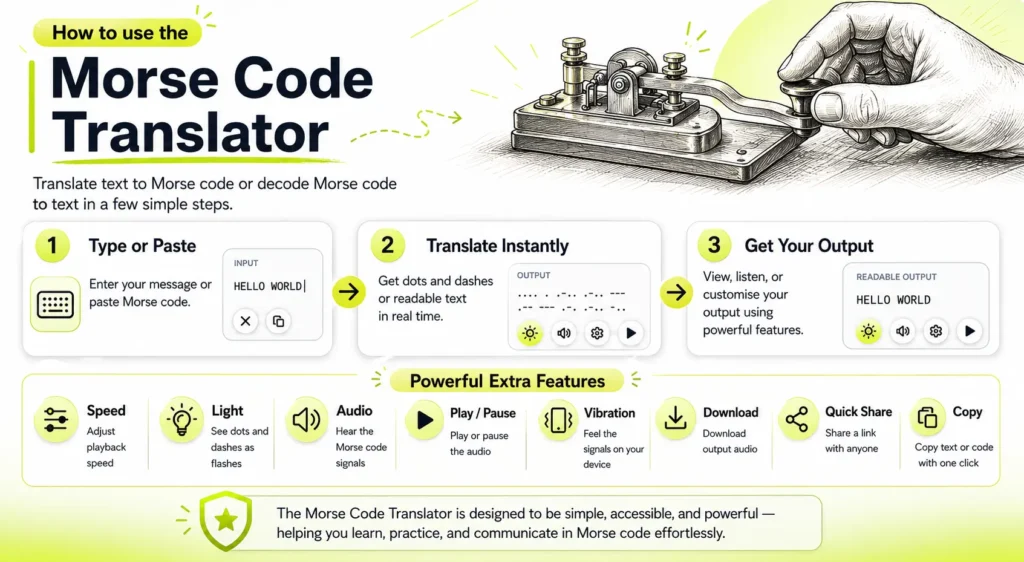
Features of the Tool
When you explore the translator, you may notice it does more than just convert text into Morse code. They have some features that make the experience smoother and more practical. Many people expect a basic Morse Code Converter. But a good tool also lets you control how you feel, hear, and share the output.
Below are the main functions that help you interact with Morse code in different ways.

Copy
Sometimes you just need the text or code quickly, no extra steps. The copy feature lets you copy the translated result with one click, and then you can paste it anywhere you want.

Download
After translating your message, you can download its output audio directly. Instead of copying it manually, you can download it directly. This makes it easier to save the Morse code file, which you can store or use later without translating it again.

Light Flashes
Morse code is not only about sound. In many real situations, it is also sent through light signals. This feature shows visual flashes for each dot and dash to simulate light signals.
So instead of just hearing it, you can see how the pattern looks in real time.

Vibration
In mobile devices, the signals of Morse code can also be felt by vibration. This means signals are not only seen or heard, but experienced physically. This feature of Morse Code Translator allows the pattern to be felt through small pulses.

Play/Pause & Loop
Some people understand better when they listen. Hearing the short and long beeps makes the pattern easier to understand using the play and pause feature.
The play button starts the signal sequence in audio, and pause lets you stop and continue whenever you are ready. The loop option automatically restarts the audio after they completed.

Speed, Tone, and Volume
Not everyone is able to listen at the same pace. Some people prefer slow signals to understand each letter properly and clearly, while some others are comfortable with fast signals.
You can control it by adjusting the speed to control how quickly the signals play, the tone to change the pitch of the sound, and the volume to make it louder or softer. This helps you practice in a way that suits you.
Quick Share
Sharing your translation should be complicated, so we have included the Quick Share feature. This feature generates a special link for your translation, which you can send to others so they can view the same message easily.